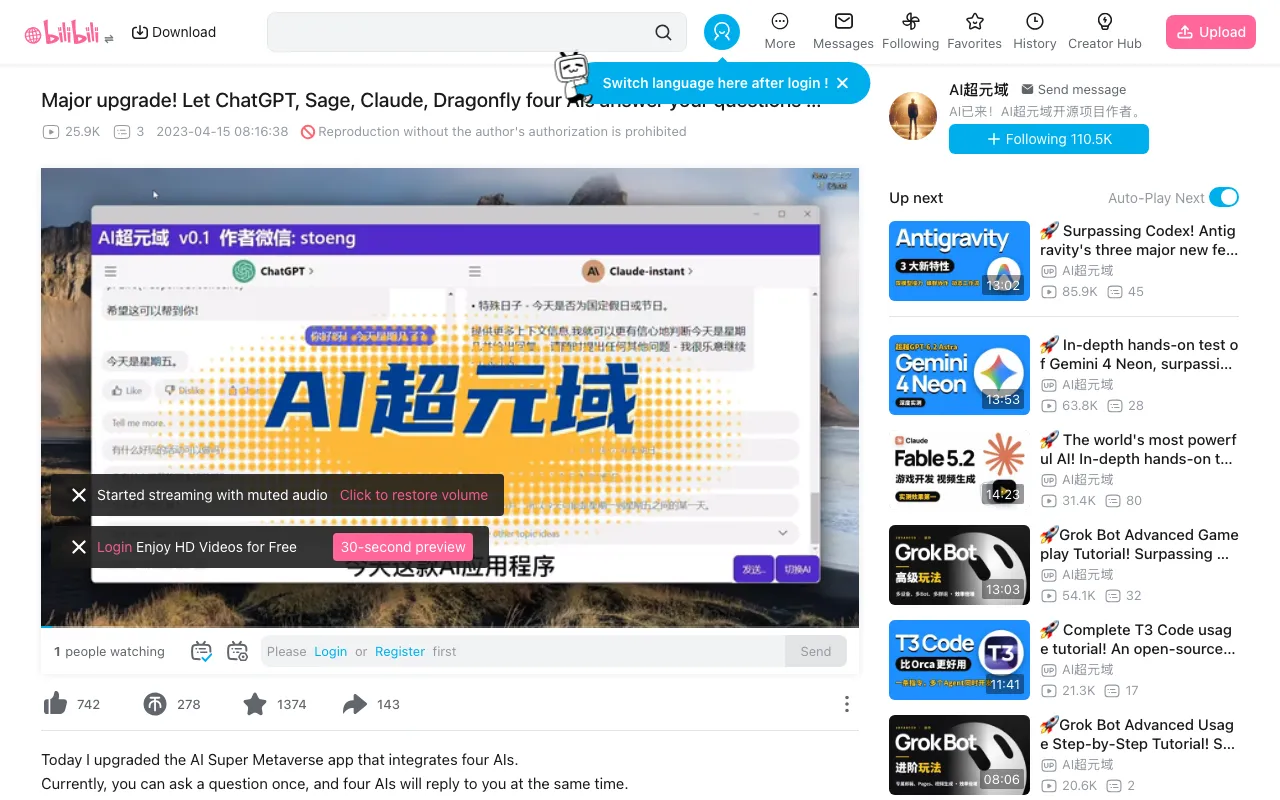
Aila (AISuperDomain) is a desktop app for Windows and macOS that sends one prompt to multiple integrated AI services and shows their answers side by side.
Overview
Aila, also branded as AISuperDomain in some materials, bundles many commercial and community AI chat experiences into one desktop interface. Users type a question once and can view simultaneous responses from a long list of supported models named in the project, including ChatGPT, Gemini, Claude, Copilot, Mistral, Poe, Coze, Perplexity, HuggingChat, and numerous others.
The interface lets users choose how many AI panels to show at once, open any single response full screen, and return to the multi-panel layout from a home control. Prompt helpers include slash-triggered suggestions and hash-prefixed persistent prompts, with submission via a keyboard shortcut or button and a switch control to cycle visible models.
Settings reachable from a fly-out menu control which models are active, how many appear, and a JSON configuration file where advanced users add models, edit prompts, and tailor behavior. Windows setup notes call for .NET 8 and installing a provided certificate before install; macOS users run the downloaded installer directly.
Materials also describe Android in the project summary and position the app as an integration layer rather than hosting models locally. Users can extend coverage by inspecting third-party chat sites and adding scripts modeled on examples such as chat.mistral.ai.
Key features
- Single prompt to many AI backends
- Configurable multi-panel response layout
- Full-screen view per model answer
- Slash and hash prompt shortcuts
- JSON configuration for models and prompts
- Fly-out model and display settings
- Windows and macOS desktop installers
- User-added scripts for new AI sites
Use cases
- Comparing answers across chat models
- Personal multi-AI research desktop
- Quick prompt testing with favorites
- Side-by-side vendor model evaluation
- Custom integration via config scripts


 ChatGPT


 Anthropic Claude