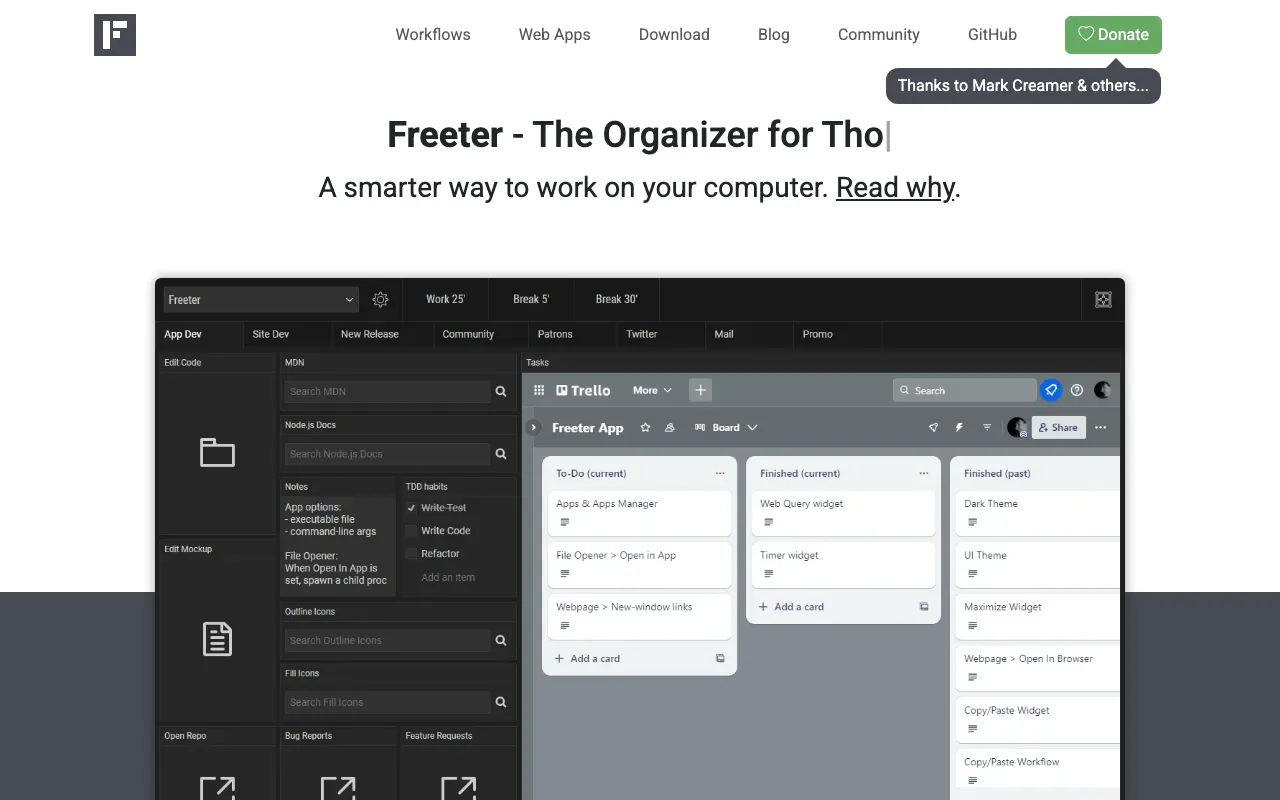
Freeter gathers project-specific tools, links, and notes on the desktop. Workflows switch from the tray or a global hotkey.
Overview
Freeter is a desktop organizer for people who do most of their work on a computer. It groups files, web apps, commands, and small utilities into projects and workflows so you open one surface instead of many separate windows.
Each project can hold multiple workflow tabs when work splits into parallel tracks or sub-projects. Widgets on a workflow might embed web pages, open files in editors, run saved shell commands, run templated web searches, show to-do lists, timers, or sticky notes. A separate Shelf holds items you want visible regardless of the active project.
You can open Freeter with Ctrl or Cmd+Shift+F or from the system tray and move between workflows to limit context switching. The interface offers a light or dark theme. The application states that it does not collect telemetry or usage tracking.
Installers are provided for Linux, Windows, and macOS on Intel 64-bit systems, with macOS builds for Apple Silicon as well. Users download ready-made packages rather than running a hosted service.
Key features
- Projects and workflow tabs
- Embedded webpage widgets
- File opener for project paths
- Saved terminal commands
- To-do lists and timers
- Quick notes on workflows
- Global hotkey and tray access
- Light and dark themes
Use cases
- Isolating tools per client project
- Keeping daily web apps in one window
- Re-running frequent terminal commands
- Short-focus work with countdown timers
- Pinned utilities on the Shelf


 Clockify

 Asana
 Jira


 Trello