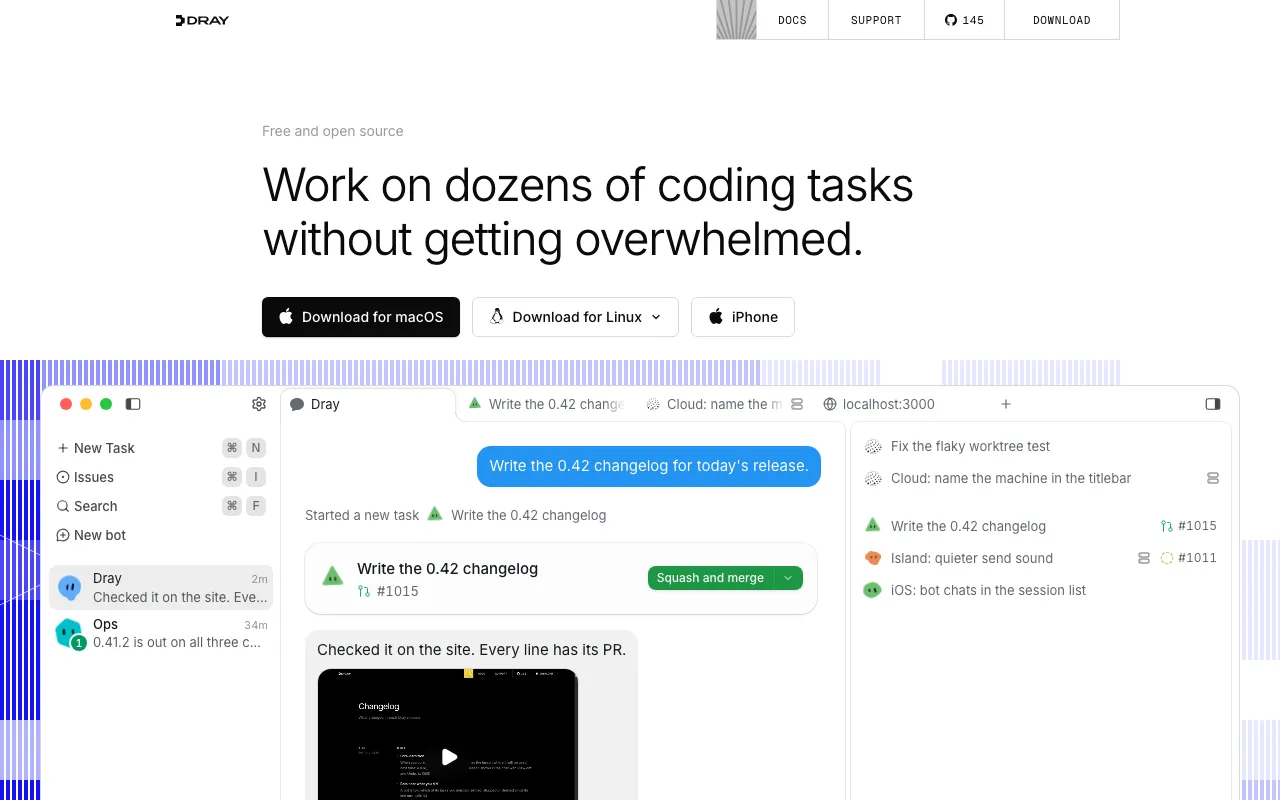
Dray wraps coding-agent command-line tools in a native chat interface on your Mac or Linux machine. Run parallel sessions with worktrees, diffs, issues, pull requests, and an embedded browser.
Overview
Dray gives developers one desktop application to run several coding agents, including Claude Code, Codex, pi, fx, Grok, and OpenCode, using the subscriptions they already have. Each session gets its own worktree, diff view, pull request panel, issue panel, and built-in browser so you can review and merge work beside the chat.
You can start tasks on one machine and run them on another, such as a Mac mini or a Linux server, and keep work going when you close your laptop. A standalone CLI talks to the running app over a local socket so an agent in one session can create, list, and message others. On Linux, the same setup can turn the machine into a Dray server controlled from the app elsewhere.
Workflow features include picking up GitHub or Linear issues linked to chat, merging when checks pass, opening a local dev server in the embedded browser, and voice input with optional screen region capture. Notifications appear when a session needs attention or finishes.
Dray is free under Apache 2.0. It runs Anthropic's Claude Code CLI for Claude sessions so usage stays within provider terms, and it keeps your data on your machine while agents contact their own providers as usual.
Key features
- Multiple parallel agent chat sessions
- Per-session git worktrees and diff views
- GitHub and Linear issue integration
- In-app PR review and merge
- Embedded browser for local dev servers
- Voice and screenshot input from any app
- CLI for cross-session agent messaging
- Linux server mode for remote execution
Use cases
- Running several coding agents in one UI
- Reviewing diffs and merging pull requests in chat
- Working across Mac and Linux machines on one task
- Testing apps in a built-in browser during agent runs
- Handling GitHub or Linear tickets from a single app


 Claude Code