Lazygit
Terminal user interface for everyday Git workflows
Lazygit wraps common Git operations in a keyboard-driven terminal UI. You can stage partial changes, rebase, cherry-pick, and inspect history without memorizing fragile command sequences.
Structural diff tool that understands syntax
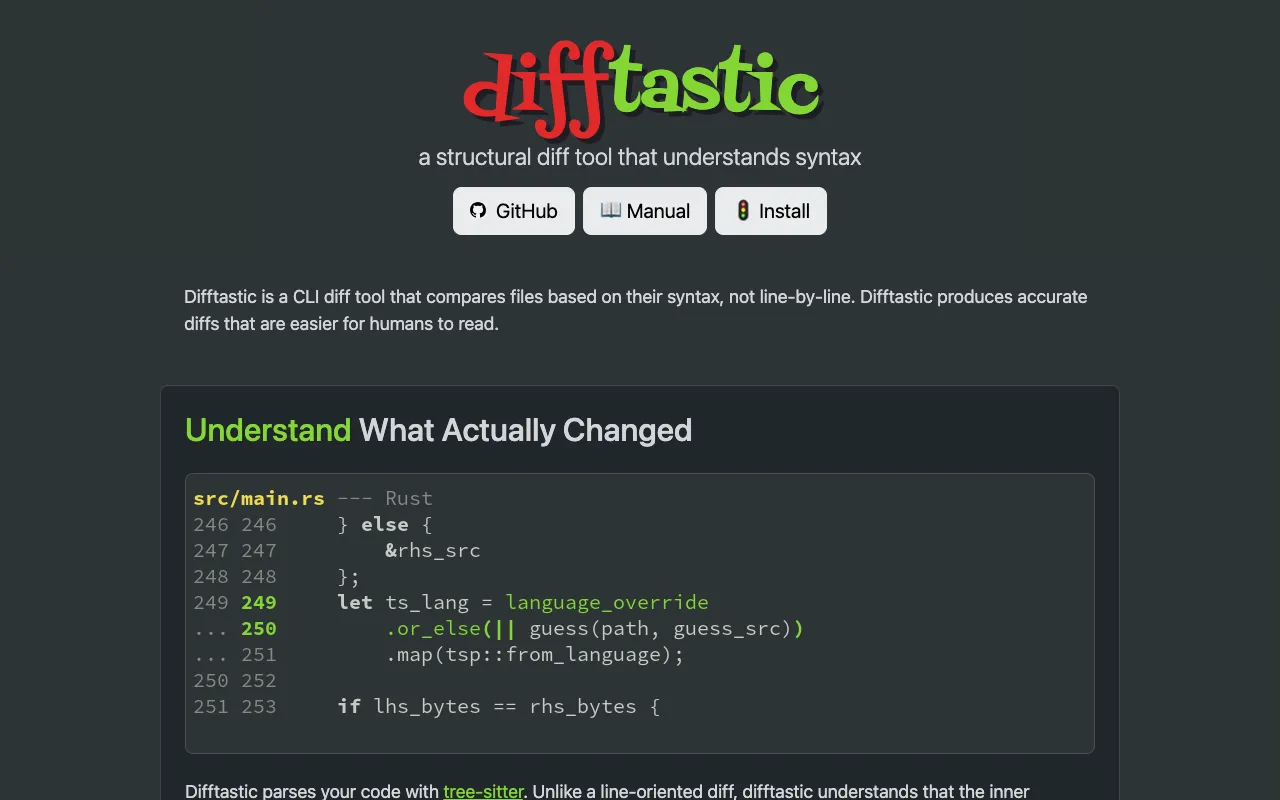
Difftastic compares files by parsing their syntax rather than diffing line by line. It is a CLI that highlights real code changes, including reflows across lines.
Difftastic is a command-line diff utility built around syntax-aware comparison. It parses source with tree-sitter and reports which syntactic pieces changed, showing them in side-by-side context so reviewers can see what moved versus what was merely reformatted.
When whitespace is only indentation or formatting, the tool can treat it differently from meaningful edits. If a formatter splits an expression across lines, the diff still reflects the underlying change instead of treating every new line as novel content. For unrecognized file extensions it falls back to a line-oriented diff with word highlighting.
It supports more than thirty programming languages plus formats such as JSON, YAML, HTML, and HCL, with a manual listing the full set. Git and Mercurial integration is documented, and it can read merge conflict markers to diff the two conflict sides in one file. A check mode compares abstract syntax without printing a full diff for faster change detection.
Output targets human review: it does not emit applyable patches, and it does not perform merges. Large files with many edits can be slow and memory-heavy, and parse errors cause a conservative fallback to line-based diffing.
Terminal user interface for everyday Git workflows
Lazygit wraps common Git operations in a keyboard-driven terminal UI. You can stage partial changes, rebase, cherry-pick, and inspect history without memorizing fragile command sequences.

Self-hosted Git forge with CI/CD and packages
Gitea is an all-in-one software development service you can run on your own infrastructure. It combines Git hosting with issues, reviews, project boards, package registries, and Gitea Actions CI/CD.
Self-hosted Git service with web collaboration tools
Gogs hosts Git repositories over SSH and HTTP(S) and adds issues, pull requests, wikis, and organization features through a browser UI.
Official GitHub terminal client
GitHub CLI brings issues, pull requests, and other GitHub workflows to the terminal beside git. It works with GitHub.com, Enterprise Cloud, and supported Enterprise Server deployments.

End-to-end developer platform with SCM, CI/CD, and registries
Harness Open Source combines code hosting, automated DevOps pipelines, hosted development environments called Gitspaces, and artifact registries in one platform.
Lightweight native Git hooks for Node projects
Husky wires Git hooks so teams can lint commit messages, run tests, or check code on commit and push. It uses core.hooksPath, stays around two kilobytes gzipped, and supports macOS, Linux, and Windows.